AI Pair Programming with Claude Code: How to Work Effectively with an AI Partner

AI pair programming with Claude Code requires a different mindset. This guide covers effective patterns, what AI is good and bad at, and how to build a productive workflow.
AI pair programming is different from traditional pair programming. Your AI partner doesn't get tired, doesn't have opinions about tabs vs. spaces, and can hold the entire codebase in context — for one session.
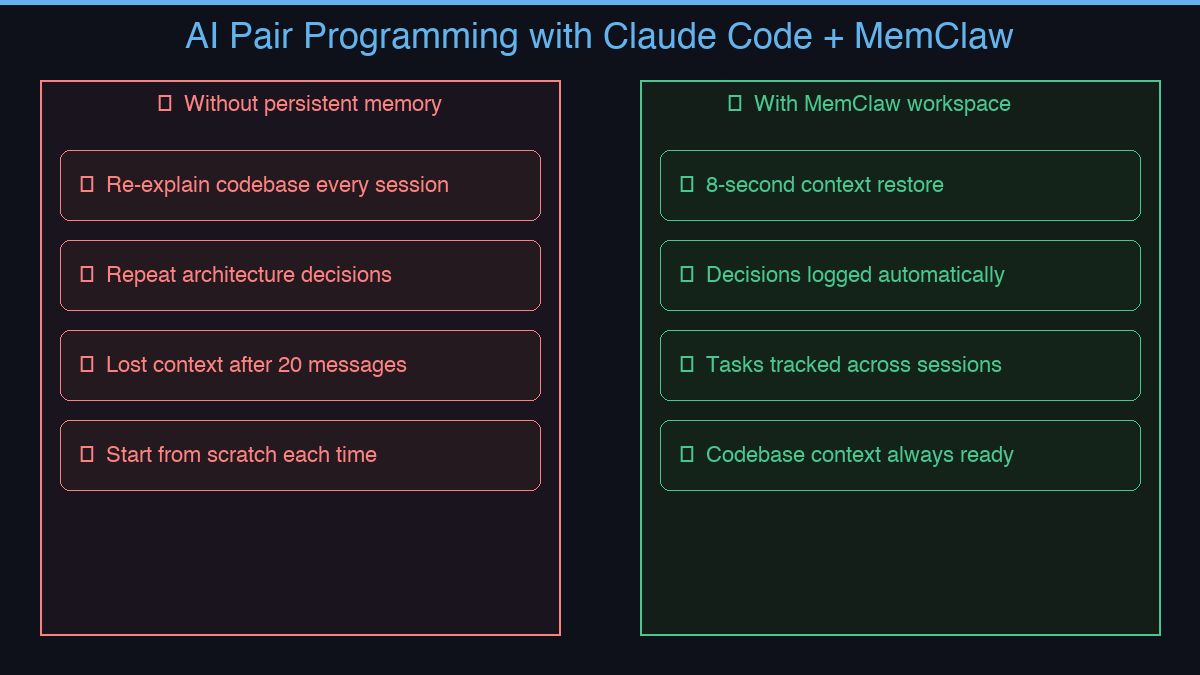
The problem shows up on day two.
You open a new session. Claude has no idea who you are, what you're building, or what you decided yesterday. You spend the first fifteen minutes re-explaining everything before you can get any real work done.
MemClaw solves the memory half of this problem.
What Makes AI Pair Programming Work
Effective AI pair programming requires two things:
- In-session context — Claude understanding your codebase, your patterns, your current task
- Cross-session memory — Claude knowing what was decided last week, what's in progress, what's already been tried
Claude Code handles the first naturally. MemClaw handles the second.
The Cross-Session Memory Problem
Without persistent memory, every session starts from zero:
- Re-explain the architecture
- Re-explain the decisions made last week
- Re-explain what's in progress
- Re-explain why you're not using the obvious approach
With MemClaw, each project has a workspace that persists across sessions:
- Living README — architecture, patterns, constraints
- Decisions — why you chose X over Y, logged permanently
- Tasks — what's in progress, what's done, what's next
- Artifacts — design docs, API specs, reference files
Context restore: 8 seconds. Your AI partner picks up exactly where it left off.
Practical Workflow
# Start of session
load workspace my-api-project

# Claude responds with full context:
# Working on the payment service refactor.
# Decision: using idempotency keys for all POST endpoints.
# In progress: webhook handler (started yesterday).
# Next: write tests for the retry logic.
From there, you're working — not re-briefing.
Tips for Effective AI Pair Programming
Be explicit about decisions. When you make an architectural choice, tell Claude to log it:
save decision: using Redis for session storage because Postgres latency was too high under load
Use tasks for continuity. Let Claude track what's in progress:
mark webhook handler as in progress
Keep workspaces project-scoped. One project = one workspace. Don't mix client work in the same workspace.
Works for More Than Developers
The pair programming model applies beyond code:
- Freelancers — one workspace per client, full context on every call
- Product managers — feature context, decision history, stakeholder notes
- Content teams — article pipelines, editorial decisions, keyword strategy
How to Install MemClaw
Claude Code Plugin Marketplace (recommended):
/plugin marketplace add Felo-Inc/memclaw
/plugin install memclaw@memclaw
export FELO_API_KEY="your-api-key-here"
Get your API key at felo.ai/settings/api-keys. OpenClaw:
bash <(curl -s https://raw.githubusercontent.com/Felo-Inc/memclaw/main/scripts/openclaw-install.sh)
memclaw.me — give your AI pair programmer a memory that actually works.