Claude Code Agent: Build a Persistent AI Workspace That Actually Remembers

Claude Code agent is powerful but forgets everything after each session. This guide shows you how to build a persistent AI workspace using MemClaw and MCP — complete setup, best practices, and honest limitations.
Claude Code is one of the most capable coding agents available. It reads your files, runs commands, edits code, and reasons through complex problems. But there's a catch every developer hits within the first week: every new session starts from zero.
You spend five minutes re-explaining your stack. Another five on the decisions you made last week. By the time you're actually working, you've lost a chunk of your session to context-setting.
MemClaw fixes this.
The Problem: No Persistent Project Memory
Claude Code's context window is powerful but finite. When a session ends, everything in it disappears. There's no built-in way to say "remember this project" — no persistent storage for decisions, no task tracking across sessions, no isolation between projects.
The result:
- Re-briefing the agent at the start of every session
- Decisions made last week getting ignored or contradicted
- Context from Project A bleeding into Project B when you switch
- No way to track what's in progress across multiple workloads
The Solution: MemClaw Project Workspaces
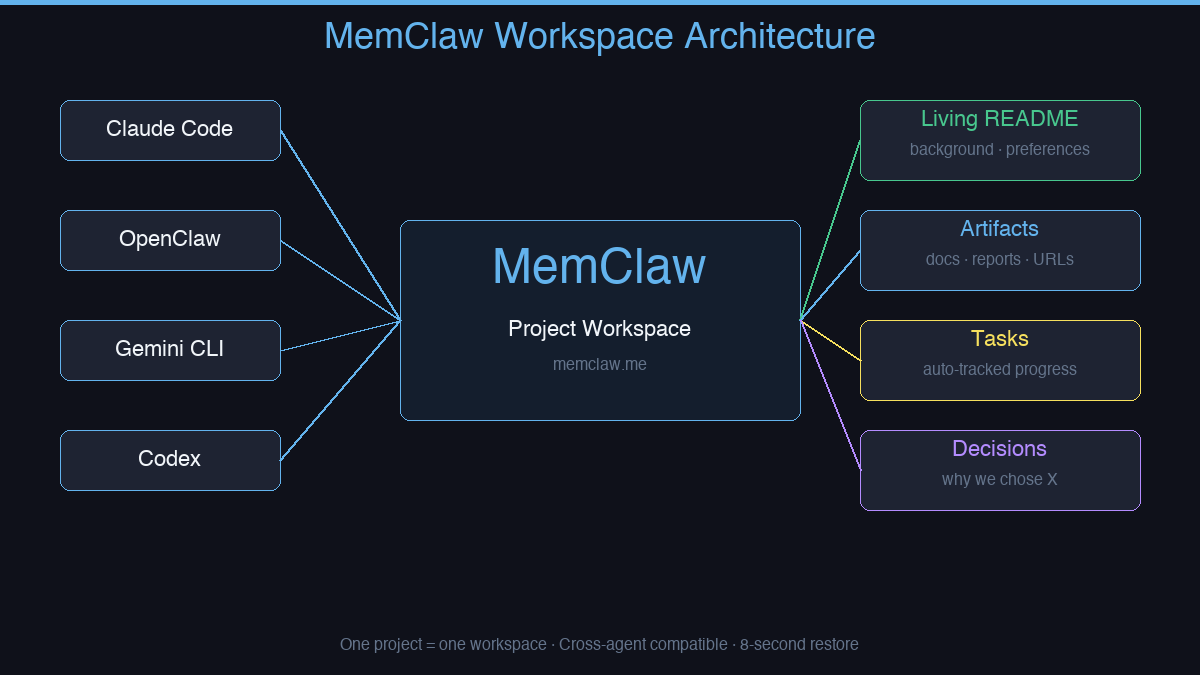
MemClaw gives each project its own isolated workspace. One project = one workspace. When you open a session, the agent loads that workspace and immediately knows where things left off.
What each workspace stores:
| Component | What it contains |
|---|---|
| Living README | Project background, preferences, current status |
| Artifacts | Documents, reports, URLs, files |
| Tasks | Auto-tracked as the agent works |
| Decisions | Why you chose X — logged permanently |
Context restore takes 8 seconds. No re-briefing. No copy-pasting. No CLAUDE.md workarounds.
Cross-Agent Compatible
MemClaw works with Claude Code, OpenClaw, Gemini CLI, and Codex. If you switch between agents on the same project, they share the same workspace — no duplication, no divergence.
Not Just for Developers
MemClaw isn't a developer-only tool. Anyone managing multiple projects with AI agents hits the same problem:
- Freelancers — Client A's context bleeds into Client B
- Product managers — five features in parallel, agent has no idea which is which
- Sales professionals — different deal histories, different requirements per account
- Anyone using AI agents across more than one workstream
Natural language interaction. No JSON config. No server process.
How to Install MemClaw
Claude Code Plugin Marketplace (recommended):
/plugin marketplace add Felo-Inc/memclaw
/plugin install memclaw@memclaw
export FELO_API_KEY="your-api-key-here"
Get your API key at felo.ai/settings/api-keys. OpenClaw:
bash <(curl -s https://raw.githubusercontent.com/Felo-Inc/memclaw/main/scripts/openclaw-install.sh)
What Changes After Installation
# Load a project workspace
load workspace client-a-redesign

# Agent responds:
# Workspace loaded. You're on Sprint 3 of the e-commerce redesign.
# Auth module complete. Checkout flow is next.
# 3 open tasks. Last decision: Stripe over PayPal for EU compliance.
That's 8 seconds instead of 10 minutes.
memclaw.me — persistent project workspaces for Claude Code agents.