Claude Code Slash Commands: A Practical Guide (2026)

Master Claude Code slash commands. Create custom workflows, automate repetitive tasks, and build reusable commands for your development workflow.
Slash commands are one of Claude Code's most underused features. They let you define reusable workflows as Markdown files — invoke them with /command-name and Claude executes the workflow.
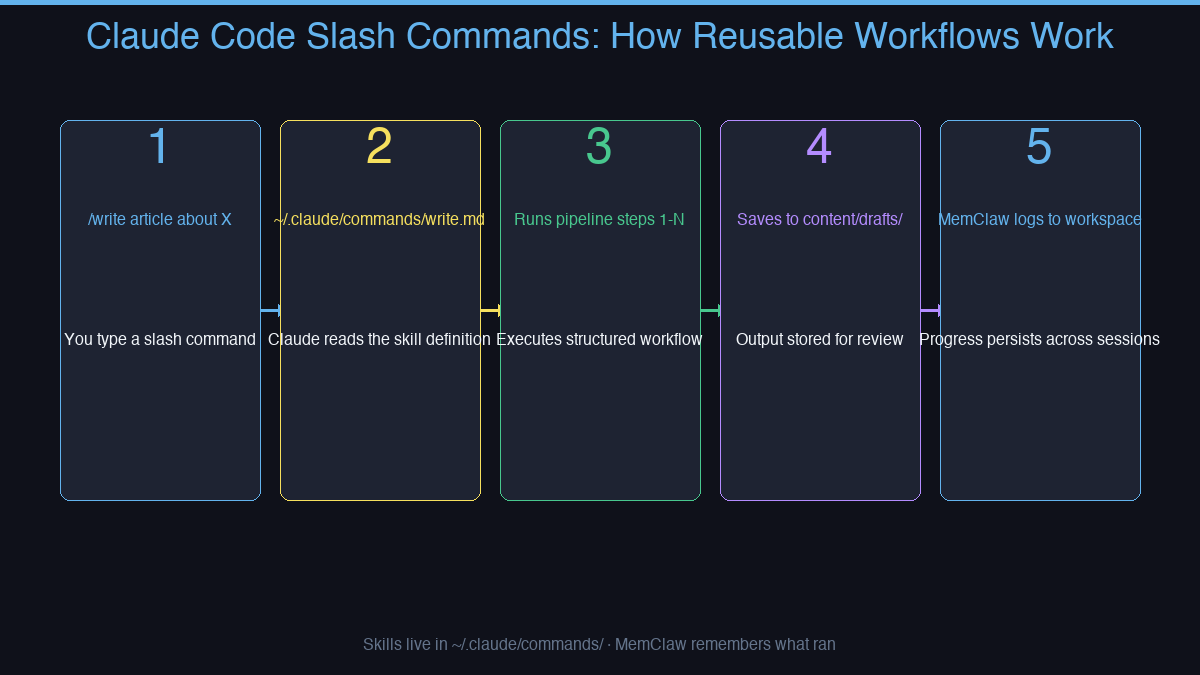
Combined with MemClaw persistent workspaces, slash commands become the backbone of a consistent, efficient development process.
How Slash Commands Work
Slash commands live in ~/.claude/commands/ as Markdown files. Each file defines a workflow — a sequence of steps Claude follows when you invoke the command.
~/.claude/commands/
  write.md        → /write
  review-pr.md    → /review-pr
  deploy-check.md → /deploy-check
When you type /write article about X, Claude reads write.md and executes every step — keyword research, outline, brand asset injection, quality scoring, output to draft file.
Why MemClaw Makes Slash Commands Better
Slash commands define how to do work. MemClaw remembers what work has been done — and keeps it isolated per project.
What MemClaw adds to every slash command run:
- Living README — the agent knows the project background before it starts
- Artifacts — draft files, research notes, published URLs stored per project
- Tasks — auto-tracked as each command runs; see what's done and what's next
- Decisions — style choices, keyword strategy, past choices logged permanently
Without MemClaw, each command run is isolated — Claude doesn't know what you've already written, what decisions you've made, or what's in progress. With MemClaw, the workspace carries full project context across every session.
Context restore: 8 seconds. Zero cross-project bleed.
Example: A Writing Workflow
A /write command might look like:
Write a 1500-word article about $ARGUMENTS.

Steps:
1. Load MemClaw workspace — check what's already been written
2. Check keyword-research/keyword-database.json for the topic
3. Write following context/style-guide.md
4. Score with content_scorer — must be ≥65
5. Save to content/drafts/$SLUG-$DATE.md
6. Log to workspace: article drafted, add to tasks
Every run follows the same process. Consistent output, full context, no re-explaining.
Building Your Command Library
Good candidates for slash commands:
| Command | What it automates |
|---|---|
/write [topic] | Full article generation pipeline |
/review-pr | PR review checklist |
/deploy-check | Pre-deployment verification |
/client-brief [name] | Load client workspace + summarize status |
/weekly-report | Pull tasks from workspace, generate report |
Who Benefits
Slash commands + MemClaw work for anyone running repeatable workflows:
- Developers — code review, testing, deployment checklists
- Content teams — article pipelines, SEO workflows
- Freelancers — client onboarding, status reports per client
- Product managers — feature briefs, sprint summaries
How to Install MemClaw
Claude Code Plugin Marketplace (recommended):
/plugin marketplace add Felo-Inc/memclaw
/plugin install memclaw@memclaw
export FELO_API_KEY="your-api-key-here"
Get your API key at felo.ai/settings/api-keys. OpenClaw:
bash <(curl -s https://raw.githubusercontent.com/Felo-Inc/memclaw/main/scripts/openclaw-install.sh)
memclaw.me — persistent project workspaces that make your slash commands smarter.