Claude Projects vs MemClaw: What Actually Works in Claude Code (2026)

Claude Projects works in the browser — not in Claude Code CLI. If you
If you use Claude Code in the terminal and you're looking for persistent memory across projects, you've probably come across Claude Projects. It sounds like exactly what you need.
There's a catch.
Claude Projects is a Claude.ai web feature. It doesn't integrate with Claude Code CLI. If you're working in the terminal, Claude Projects doesn't help you — the context doesn't carry over to your coding sessions.
This guide explains exactly what each tool does, where they work, and which one solves the problem you're actually trying to solve.
Does Claude Projects Work with Claude Code?
No. This is the most important thing to understand before comparing the two tools.
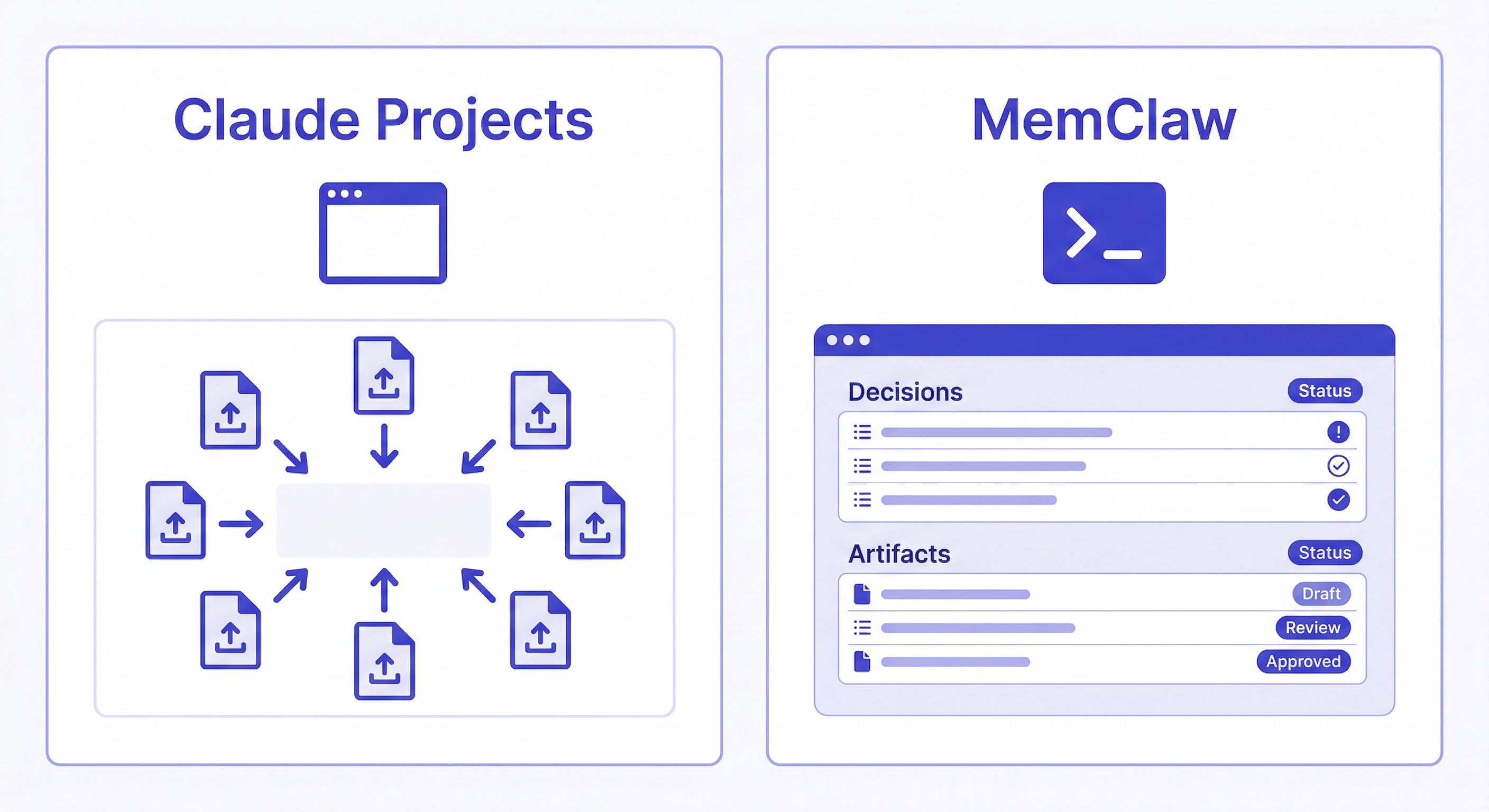
Claude Projects is a feature inside Claude.ai — the browser-based interface at claude.ai. You create a project there, upload documents, and Claude uses them as context for conversations in that project. It works well for what it is.
Claude Code is a separate product — a CLI tool you run in your terminal. It has its own session management, its own context window, and its own plugin/skill system. Claude Projects has no integration with Claude Code. Context you set up in Claude Projects does not appear in your Claude Code sessions.
If you're a developer who primarily works in Claude Code, Claude Projects solves a different problem than the one you have.
What Claude Projects Actually Does
Claude Projects lives in the Claude.ai web interface. You create a project, upload files — specs, READMEs, style guides, reference docs — and Claude uses them as persistent context across all conversations in that project.
Where it works well:
- Writers uploading brand guidelines and style docs
- Researchers keeping reference material available
- Analysts working with recurring datasets or frameworks
- Anyone who primarily uses Claude through the browser
The workflow:
- Create a project in Claude.ai
- Upload your documents
- Every conversation in that project has access to those documents
- Update documents manually when they change
What it doesn't do:
- Work in Claude Code CLI
- Track decisions with timestamps and reasoning
- Update automatically as you work
- Manage multiple projects in isolation from the terminal
- Share context across different AI agents (OpenClaw, Gemini CLI, etc.)
What MemClaw Actually Does
MemClaw is a skill for Claude Code (and OpenClaw, Gemini CLI, Codex). It installs directly into your AI agent and adds persistent project workspaces — accessible from the terminal, inside your development workflow.
Install:
/plugin marketplace add Felo-Inc/memclaw
/plugin install memclaw@memclaw
export FELO_API_KEY="your-api-key-here"
Get your API key free at felo.ai/settings/api-keys.
Create one workspace per project:
Create a workspace called MyApp
Load at the start of every session:
Load the MyApp workspace
Claude reads the workspace — decisions, status, background context — and is immediately oriented. No re-explaining your stack. No re-briefing on decisions you made last week.
What MemClaw does for Claude Code users:
- Works natively in the terminal — no browser required
- Per-project workspaces with strict isolation
- Stores decisions with reasoning and timestamps
- Workspace builds automatically as you work
- Team sharing — multiple developers load the same workspace
- Cross-agent compatibility — Claude Code, OpenClaw, and Gemini CLI all read the same workspace
Side-by-Side Comparison
| MemClaw | Claude Projects | |
|---|---|---|
| Works in Claude Code CLI | ✓ | ✗ |
| Works in Claude.ai browser | ✗ | ✓ |
| Works in OpenClaw | ✓ | ✗ |
| Setup | Install skill, create workspace | Upload documents |
| Context type | Decisions, status, artifacts, history | Uploaded documents |
| Updates automatically | ✓ Agent writes back | ✗ Manual uploads |
| Decision history with timestamps | ✓ | ✗ |
| Per-project isolation | ✓ Strict | ✓ Yes |
| Team sharing | ✓ | ✓ |
| Cross-agent (Claude Code + OpenClaw) | ✓ Same workspace | ✗ |
| Free tier | ✓ | ✓ (Claude.ai free plan) |
The Core Difference: Dynamic vs. Static
Claude Projects stores documents you upload manually. The context is whatever you put in, and it stays that way until you update it manually. It's a document store.
MemClaw workspaces are dynamic. The agent reads from them at session start and writes back to them as you work. Decisions get logged when they're made. Status updates as you progress. The workspace grows automatically.
Static (Claude Projects): You upload a README. Claude references it. When the README changes, you upload a new version. The context is always a snapshot of what you last uploaded.
Dynamic (MemClaw):
Add decision to workspace: using Postgres over MySQL.
Reason: client DBA only supports Postgres. Not negotiable.
Date: 2026-04-10.
Update workspace status: auth middleware refactor complete.
JWT validation extracted. Route handlers updated. Next: tests.
The workspace accumulates context over time without you maintaining it manually. After a month, it has a full record of every decision made and why — something a static document store can't replicate.
The Multi-Project Problem
This is where the tools diverge most sharply.
If you're a freelancer with five clients, or a developer running multiple projects in parallel, context isolation is critical. You don't want Client A's requirements bleeding into Client B's conversation.
With Claude Projects: You create separate projects in Claude.ai. This works for browser-based work. But in Claude Code, there's no equivalent — each session starts from zero regardless of what you've set up in Claude.ai.
With MemClaw:
Load the Acme workspace
→ Claude has Acme context only. Nothing from other projects.

[finish Acme work]

Load the Beta Corp workspace
→ Claude switches completely. Acme is gone. Beta Corp context is loaded.
Each project has its own isolated workspace. Zero cross-contamination. This is the scenario MemClaw is built for.
When to Use Each
Use MemClaw if:
- You use Claude Code or OpenClaw in the terminal
- You're managing multiple projects or clients simultaneously
- You want memory that builds automatically as you work
- You need decision history — not just current state, but why decisions were made
- You're on a team that needs shared project context in Claude Code
Use Claude Projects if:
- You primarily use Claude.ai in the browser
- Your workflow is document-heavy (uploading specs, guides, reference material)
- You don't use Claude Code CLI
- You're doing writing, research, or analysis — not terminal-based development
Use both if: You use Claude Code for development (MemClaw handles code context) and Claude.ai for other work like writing or research (Claude Projects handles document context). They serve different tools and don't conflict.
A Real Example
You're building a SaaS product. You use Claude Code for development and Claude.ai for writing marketing copy.
In Claude Code (MemClaw):
Load the MySaaS workspace
Continue with the payment integration. What's the current status?
Claude reads the workspace: knows you're using Stripe, knows the webhook handler is done, knows the retry logic is next. No re-briefing.
In Claude.ai (Claude Projects): You've uploaded your brand guidelines, target audience doc, and positioning brief. Claude uses these to write marketing copy that's consistent with your brand.
Different tools, different context, same project. Both persistent, neither conflicting.
Frequently Asked Questions
Can I use Claude Projects in Claude Code? No. Claude Projects is a Claude.ai web feature only. It has no integration with Claude Code CLI. Context set up in Claude Projects does not appear in Claude Code sessions.
What's the Claude Code equivalent of Claude Projects? MemClaw is the closest equivalent for Claude Code users — persistent project context that loads at session start. The key difference is that MemClaw is terminal-native and builds context dynamically, while Claude Projects is browser-based and stores static documents.
Does MemClaw work with Claude.ai? No. MemClaw is a skill for Claude Code, OpenClaw, Gemini CLI, and Codex. It doesn't integrate with the Claude.ai web interface.
Can I use both MemClaw and Claude Projects? Yes, and it makes sense if you use both tools. MemClaw handles your Claude Code development sessions; Claude Projects handles your Claude.ai browser sessions. They serve different tools and don't conflict.
Is MemClaw free? MemClaw has a free tier. Get your API key at felo.ai/settings/api-keys.
Does MemClaw work with OpenClaw? Yes. MemClaw workspaces are compatible with Claude Code, OpenClaw, Gemini CLI, and Codex. You can switch between agents and they all read from the same workspace.
What happens to my Claude Projects context when I switch to Claude Code? Nothing — it stays in Claude.ai. Claude Code has no access to Claude Projects. This is why developers who use Claude Code need a separate memory solution like MemClaw.
Getting Started with MemClaw
For Claude Code and OpenClaw users:
- Install MemClaw → memclaw.me
- Create one workspace per active project
- Seed it with current context: stack, key decisions, current status
- Load the workspace at the start of every session
- Log decisions and status as you work
The context compounds. After two weeks, Claude starts answering questions from the workspace instead of asking you to re-explain.
Disclosure: Written by the Felo team, which makes MemClaw. Claude Projects is described based on Anthropic's public documentation.