OpenClaw Memory vs Mem0: Which AI Memory Tool for Developers?

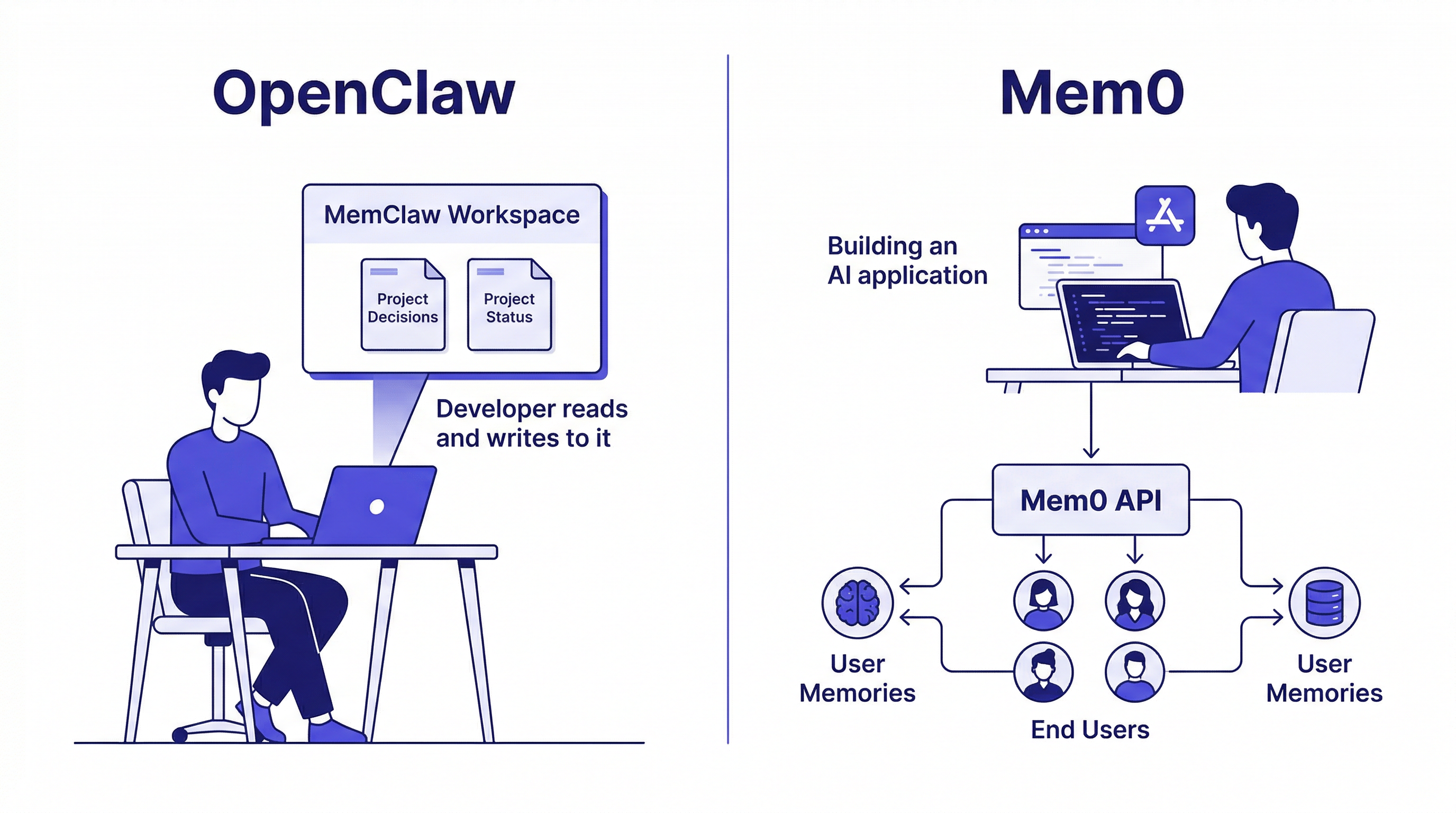
OpenClaw memory (via MemClaw) and Mem0 both solve AI memory loss — but for different audiences. MemClaw is for developers using OpenClaw. Mem0 is infrastructure for AI app builders.
Both OpenClaw memory (via MemClaw) and Mem0 solve the same core problem: AI agents forget everything between sessions. But they solve it differently, for different audiences.
Short version:
- MemClaw = persistent project workspaces for developers using OpenClaw and Claude Code, skill-based installation, no custom code required
- Mem0 = memory infrastructure you embed in AI applications you're building, open-source API
They're not competing for the same user. Most developers need one or the other — and the choice is usually clear once you understand what each does.
What Is Mem0?
Mem0 is an open-source AI memory layer (Apache 2.0) built as infrastructure for developers building AI-powered applications.
How it works: You integrate the Mem0 SDK into an application. When your users have conversations, Mem0 automatically extracts and stores relevant facts, preferences, and history. Future conversations retrieve relevant memories to personalize responses.
Architecture: Multi-layer storage — vector database for semantic similarity, knowledge graph for relationship modeling. Python and JavaScript SDKs. Self-hostable or managed cloud.
Target user: Developer building an AI product that needs user-level memory — support bots, learning apps, AI assistants with user accounts.
Mem0 is infrastructure you build on top of. It's not a tool you use directly.
What Is OpenClaw Memory (MemClaw)?
MemClaw is a persistent workspace skill for OpenClaw (and Claude Code, Gemini CLI, Codex). It's a tool you use directly — install it on your agent, create workspaces for your projects, load context at session start.
How it works: Each project gets an isolated workspace. The agent reads it at session start and writes decisions, status, and artifacts back to it as you work. Context persists across sessions automatically.
Target user: Developer (or PM, freelancer, consultant) using OpenClaw for project work who wants it to remember context between sessions.
OpenClaw Integration: Where MemClaw Has the Clear Advantage
For OpenClaw users, MemClaw integrates as a native skill:
Install:
# Via OpenClaw
bash <(curl -s https://raw.githubusercontent.com/Felo-Inc/memclaw/main/scripts/openclaw-install.sh)

# Via OpenClaw natural language
Please install https://github.com/Felo-Inc/memclaw and use MemClaw after installation.
export FELO_API_KEY="your-api-key-here"
After installation, you interact with it entirely through natural language:
Create a workspace called Client Acme
Load the Client Acme workspace
Add decision: using REST over GraphQL — team isn't familiar with GraphQL
Save that competitor analysis to the workspace
What did we decide about the API structure?
No custom code. No configuration files. Works within the existing OpenClaw workflow.
Mem0 with OpenClaw: Mem0 is designed to be embedded in applications you're building — not used directly in an agent workflow. To use it with OpenClaw, you'd need to build a custom integration layer. That's significant overhead for a developer who just wants their agent to remember projects.
Storage Model: Workspaces vs. Memories
MemClaw workspaces are project-scoped containers. Everything related to Client Acme is in the Client Acme workspace. Everything related to Client Beta is in the Client Beta workspace. The workspace model maps directly to how developers think about their work.
Mem0 memories are entity-scoped facts. The system extracts discrete memories from conversations and retrieves relevant ones based on context. More granular and more automatic — but less predictable. You don't control exactly what gets stored or how it's organized.
For explicit control over what your agent knows about your projects: workspaces are more intuitive.
For applications where you need to automatically learn user preferences without explicit logging: Mem0's extraction approach is more powerful.
Side-by-Side Comparison
| MemClaw | Mem0 | |
|---|---|---|
| What it's for | Your OpenClaw/Claude Code workflow | AI apps you're building |
| Memory scope | Per project | Per user |
| Integration | Install as skill, natural language | Python/JS SDK, REST API |
| Storage model | Structured workspaces | Extracted memories (vector + graph) |
| Self-hosting | No | Yes (Apache 2.0) |
| Team sharing | ✓ | ✗ (personal memory) |
| Project isolation | ✓ Hard isolation | ✗ Unified per user |
| Setup complexity | Low (skill install) | Medium (SDK integration) |
When to Use Mem0
- Building an AI application with user accounts that needs to remember user preferences
- AI customer support that needs history per user
- Personalized learning apps that track what each student knows
- Applications where you need memory to be automatic and transparent to users
- You need self-hosting for data sovereignty
- Open-source model is required for your use case
When to Use MemClaw
- You use OpenClaw or Claude Code for development work
- You need the agent to remember your projects between sessions
- You work on multiple projects simultaneously and need clean isolation
- You're on a team that needs shared project context
- You want persistent memory without writing custom integration code
How to build a knowledge base with OpenClaw →
Can You Use Both?
Yes. They operate at completely different layers.
MemClaw handles your developer workflow — your context as you build things.
Mem0 is infrastructure inside the things you're building — your users' context inside your AI products.
If you're using OpenClaw to build an AI product with user memory (a support bot, a personalized assistant), you might naturally use both: MemClaw for your own workspace as you develop, Mem0 as a component inside the product.
Getting Started with MemClaw
- Install via Claude Code plugin marketplace (
/plugin marketplace add Felo-Inc/memclaw) - Set
FELO_API_KEY - Create one workspace per active project
- Load the workspace at the start of every session