How to Generate Presentations With OpenClaw: A Guide to AI Slide Skills

OpenClaw can generate professional PPTX files from a text prompt. This guide covers Felo Slides and Content-to-Slides — two skills that fill the presentation gap in the OpenClaw ecosystem.
Here's a blind spot in the OpenClaw ecosystem that nobody talks about: there's no widely-known OpenClaw PPT skill.
We went through 30+ "best OpenClaw skills" articles and community threads while researching our skills guide. Not one mentioned a slide or presentation generation skill. The top 10 lists cover web browsing, search, Telegram, email, databases — but creating a slide deck? Apparently not on anyone's radar.
That's odd, because "make me a presentation about X" is one of the most natural things to ask an AI agent. And it turns out there are skills that do this — they're just not well-known yet.
This guide covers two OpenClaw PPT skills that handle presentation generation: Felo Slides (text prompt → PPTX) and Felo Content-to-Slides (URL or YouTube video → PPTX).
What You Need Before Starting
Both skills are part of the Felo skills family and share the same setup:
- A
FELO_API_KEY— free from felo.ai (Settings → API Keys) - Node.js installed (for running the skill scripts)
# Set your API key
export FELO_API_KEY="your-api-key-here"

# Install the skills
npx clawhub@latest install felo-slides
npx clawhub@latest install felo-content-to-slides
Total setup time: about 2 minutes.
Felo Slides — Text Prompt to PPTX
The core skill. Describe what you want, and it generates a professional slide deck.
How it works:
- You give your agent a prompt like "Create a 10-slide presentation about our Q1 marketing results"
- The skill sends the request to Felo's PPT API (
POST /v2/ppts) - The API generates slides asynchronously — the skill polls for completion
- Once done, you get two things back:
- A PPTX download link
- A LiveDoc URL for browser-based editing
The async approach matters. Slide generation takes 30-60 seconds depending on complexity. The skill handles the waiting and polling automatically — you don't need to babysit it.
What the output looks like:
Generated slides use HTML-based rendering. Each element — text blocks, images, shapes — is an independent, editable object. This is different from image-based generators (like some Gemini integrations) where each slide is a flat picture that's hard to modify.
You can edit the output in two ways: - Download the PPTX and open it in PowerPoint or Google Slides - Use the LiveDoc URL to edit in Felo's browser editor (drag-and-drop for simple changes, AI-assisted editing for complex modifications)
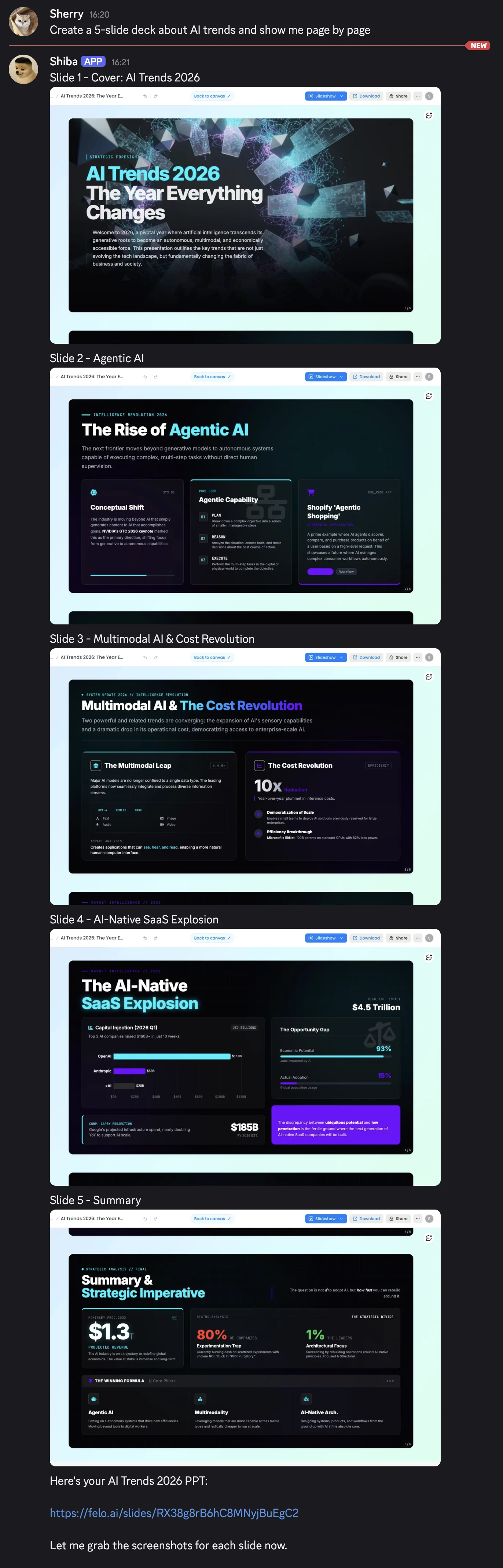
Example prompts that work well:
"Create a 10-slide deck about AI trends in 2026 for a tech audience"
"Make a project status presentation covering timeline, budget, and risks"
"Generate a sales pitch for a SaaS product targeting small businesses"
Tips for better results: - Specify the number of slides you want - Mention the audience (technical, executive, general) - Include the key topics or sections to cover - If you want a specific style, mention it ("minimal", "corporate", "creative")
Felo Content-to-Slides — Turn Existing Content Into Presentations
The second skill solves a different problem: you already have content somewhere (a blog post, a report, a YouTube video) and want to turn it into slides.
How it works:
- Give your agent a URL — either a webpage or a YouTube video link
- The skill extracts the content:
- For web pages: uses
felo-web-fetchto grab the page content as markdown - For YouTube: uses
felo-youtube-subtitlingto extract the video's subtitles - The extracted content is then passed to
felo-slidesto generate a PPTX
It's essentially a pipeline that chains three Felo skills together automatically.
Practical use cases:
- Turn a competitor's blog post into a competitive analysis deck
- Convert a YouTube tutorial into training slides for your team
- Transform a long report into an executive summary presentation
- Repurpose your own blog content into conference talk slides
# Install (if you haven't already)
npx clawhub@latest install felo-content-to-slides

Then ask your agent:
"Turn this article into a presentation: https://example.com/blog/ai-trends"
"Make slides from this YouTube video: https://youtube.com/watch?v=..."
How the Skills Fit Together
Both presentation skills are part of a larger Felo ecosystem. Here's how they connect:
felo-search ──→ Research a topic
 ↓
felo-slides ──→ Generate slides from the research
 ↓
felo-livedoc ──→ Save and edit in LiveDoc canvas

felo-web-fetch ──→ Extract webpage content
 ↓
felo-content-to-slides ──→ Convert to presentation

felo-youtube-subtitling ──→ Extract video subtitles
 ↓
felo-content-to-slides ──→ Convert to presentation
All skills share one FELO_API_KEY. Install what you need, skip what you don't.
Limitations to Know About
Being straightforward about what these skills can and can't do:
Felo Slides: - Generation takes 30-60 seconds — not instant - Design customization is limited to what the API supports (you can't specify exact fonts or color palettes in the prompt) - Complex data visualizations (charts with specific data points) may need manual editing after generation - Requires internet access — no offline generation
Content-to-Slides: - Output quality depends on the source content quality — garbage in, garbage out - Very long articles may get summarized aggressively to fit a reasonable slide count - YouTube subtitle extraction depends on the video having captions available - Paywalled content can't be extracted
Both: - Require a Felo API key (free, but still an extra setup step) - Generated slides may need human review and editing for important presentations - Not a replacement for a professional designer — they're a fast first draft
Alternatives on ClawHub
To be fair, Felo Slides isn't the only OpenClaw PPT skill available. A few other options exist:
- pptx-creator — A community skill that generates basic PPTX files. Less polished output, but no API key required.
- Manual workflow — Use any search/web skill to gather content, then ask your agent to write slide content in markdown, and convert manually.
- aippt.com integration — AIPPT offers an OpenClaw integration for their slide generation service. Paid.
The Felo skills are the most feature-complete option we've found (editable HTML slides, LiveDoc editing, content-to-slides pipeline), but they're not the only path.
Quick Start Checklist
Here's the fastest path from zero to generated slides:
- [ ] Get a free API key at felo.ai → Settings → API Keys
- [ ] Run
export FELO_API_KEY="your-key" - [ ] Run
npx clawhub@latest install felo-slides - [ ] Ask your agent: "Create a 5-slide presentation about [your topic]"
- [ ] Download the PPTX or edit in LiveDoc
Total time: under 5 minutes from start to first generated deck.
Get your API key: felo.ai → Settings → API Keys